Technical SEO Is Four Gates, Not a 200-Point Checklist
What technical SEO actually covers, how Google crawls, renders, indexes and serves pages, and how to diagnose problems gate by gate.
Technical SEO is the work of making sure search engines can crawl, render, index and serve your pages. Everything else in SEO, your content, your links, your brand, sits on top of that. Here’s a detail most technical SEO guides still get wrong: for Google Search, Googlebot reads the first 2MB of an HTML file. Not 15MB. Anything past that cutoff isn’t considered for indexing, and the limit applies to uncompressed data.
Most pages never get close to 2MB. But a page builder dumping inline SVGs, a framework shipping a giant JSON payload, or a product page with 400 variants baked into the markup can. And that’s the point. Technical SEO isn’t a 200-point checklist. It’s four gates your page has to pass in order, and a page that fails one gate never reaches the next.
What Technical SEO Actually Covers
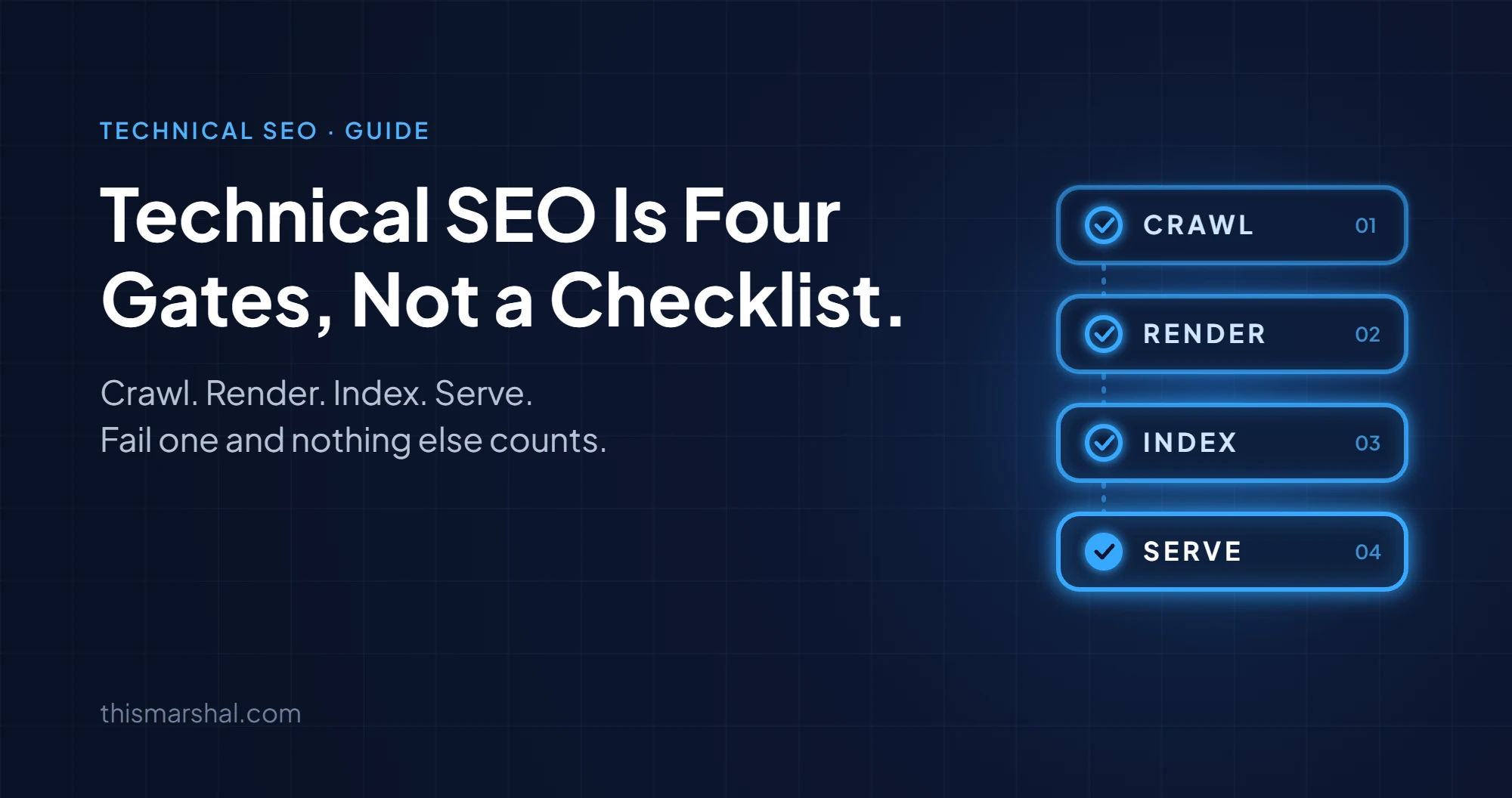
Google describes Search in stages. Googlebot crawls a URL, renders it if it relies on JavaScript, decides whether to index it, then decides whether and how to serve it. Technical SEO is the job of keeping each stage clean.
-
Gate 1, Crawl. Can Googlebot fetch the URL at all?
-
Gate 2, Render. Does the content exist once the page is processed?
-
Gate 3, Index. Does Google choose to store this URL as the version that represents the content?
-
Gate 4, Serve. Is the page eligible for the features you want, from snippets and rich results to AI Overviews?
Checklists mix these gates together. That’s why teams spend a sprint compressing images while the real problem is a noindex tag on the template. Diagnose by gate and the priority order sorts itself out.
Gate 1: Can Googlebot Crawl the Page?
Google’s technical requirements start here: Googlebot isn’t blocked, and the page is publicly accessible.
What breaks this gate:
-
robots.txt Disallow rules. Often left over from staging or copied from a template.
-
Firewalls, CDNs and bot protection. Security tools sometimes challenge or block Googlebot without anyone noticing.
-
Server errors. Repeated 5xx responses and 429s tell Googlebot to slow down, so fewer URLs get crawled.
-
Oversized HTML. Googlebot stops at 2MB of uncompressed HTML. If your main content sits after a huge inline payload, it may not be read.
One thing worth knowing: robots.txt controls crawling, not indexing. Google says plainly that robots.txt is not a mechanism for keeping a web page out of Google. A blocked URL can still show up in results without a description if other pages link to it. If you want a page out of Google, use noindex or password protection.
How to check: run URL Inspection in Search Console, and open the Crawl Stats report to see response codes and host status. Also keep in mind that Google primarily crawls and indexes the mobile version of your content, so test with the smartphone crawler, not your desktop view.
Gate 2: Does the Content Exist After Rendering?
Google processes JavaScript pages in three phases: crawling, rendering and indexing. Pages that return a 200 get queued for rendering, and Google says that queue can take a few seconds or longer.
What breaks this gate:
-
Client-side only content. Product details, prices or body copy that only appear after JavaScript runs.
-
Links without a real href. Navigation built on click handlers instead of crawlable
<a href>links. -
Robots meta tags changed by JavaScript. If the original HTML says noindex, Google may skip rendering entirely, so a script that removes the tag later may never run.
-
Blocked resources. CSS or JS files disallowed in robots.txt that the page needs to render.
Google recommends server-side rendering, static rendering or hydration, and treats dynamic rendering as a workaround, not a long-term solution.
How to check: compare the raw HTML with the rendered HTML in URL Inspection. If something important is missing from the rendered version, Google can’t use it.
Gate 3: Does Google Index the Right URL?
Passing the first two gates gets you considered. It doesn’t get you indexed. Google’s own documentation says indexing isn’t guaranteed even when a page meets every requirement.
The baseline requirements are simple: the page returns HTTP 200, it has indexable content in a supported file type, and it doesn’t violate spam policies. Most indexing problems come from conflicting signals instead.
What breaks this gate:
-
Accidental noindex. Left on a template after a redesign or set by a plugin default.
-
noindex plus a robots.txt block. For noindex to work, Google has to crawl the page. Block it in robots.txt and Google never sees the noindex.
-
Canonical confusion. rel=“canonical” is a signal, not a command. If your canonical tags, internal links, sitemap and redirects point at different URLs, Google picks its own canonical.
-
Duplicate and thin URLs. Parameters, filters and near-empty pages that compete with the pages you actually care about.
How to read the Page indexing report in Search Console:
| Status | What it usually means | First thing to check |
|---|---|---|
| Discovered, currently not indexed | Google knows the URL but hasn’t crawled it yet | Internal links, server capacity, URL volume |
| Crawled, currently not indexed | Google crawled it and chose not to index it | Content quality and duplication |
| Duplicate, Google chose different canonical than user | Your signals disagree | Canonical, internal links, sitemap, redirects |
| Excluded by noindex tag | A noindex tag is present | Whether that was intentional |
| Blocked by robots.txt | Googlebot can’t crawl it | Whether the Disallow rule is still needed |
Don’t panic over every excluded URL. Plenty of exclusions are correct. Check whether the URLs that make you money are indexed, and work backwards from there. If you run Shopify, a lot of what looks like a duplicate content crisis is normal behavior, which I break down in Shopify duplicate content: what’s actually a problem and what isn’t.
Gate 4: Is the Page Eligible to Be Served Well?
An indexed page can still underperform because of how it qualifies for search features.
Page experience. Google’s ranking systems use Core Web Vitals, assessed at the 75th percentile of real visits:
| Metric | Measures | Good |
|---|---|---|
| LCP (Largest Contentful Paint) | Loading | 2.5 seconds or less |
| INP (Interaction to Next Paint) | Responsiveness | 200 ms or less |
| CLS (Cumulative Layout Shift) | Visual stability | 0.1 or less |
Google also says good scores don’t guarantee good rankings. Fix templates marked “Poor” first, then move on. Chasing a perfect Lighthouse score is rarely the best use of a developer’s week.
Structured data. Valid markup makes a page eligible for rich results. Eligible isn’t the same as guaranteed. Mark up only what users can see, and validate templates in the Rich Results Test. Duplicate markup from themes and apps is a common failure, and your review app may be duplicating your Shopify product schema right now.
AI features. Google says there are no additional technical requirements for AI Overviews or AI Mode. A page needs to be indexed and eligible to be shown with a snippet. That means snippet controls matter: nosnippet and similar preview controls also limit how your content appears in AI features.
How to Diagnose a Technical SEO Problem by Gate
When traffic drops or a page won’t rank, work through the gates in order:
-
Crawl. Does URL Inspection show the page was fetched successfully with the smartphone crawler?
-
Render. Does the rendered HTML contain the main content, internal links and correct robots meta tag?
-
Index. Is the URL indexed, and is it the canonical Google selected?
-
Serve. Is the page passing Core Web Vitals, carrying valid structured data, and eligible for snippets?
Stop at the first gate that fails. Fixing Gate 4 issues on a page stuck at Gate 1 is wasted effort, and it’s the most common mistake I see in technical SEO audits.
Market-specific work comes after these gates. If you target a specific country, read how technical SEO works for Australian websites, where domain, hosting and hreflang decisions come into play.

Your Review App Just Duplicated Your Shopify Product Schema
Your theme adds Product schema. Your review app adds more. Your SEO app adds a third. Here's how to find and fix duplicate schema before it costs you rich results.
When to Bring In a Technical SEO Specialist
Most of these technical SEO checks are free and take an afternoon. Bring in outside help when:
-
A site migration, redesign or CMS change is planned or just happened
-
Organic traffic dropped and the gate-by-gate check didn’t explain it
-
Your site runs on a JavaScript framework and nobody owns rendering
-
The fixes are clear but your dev team can’t prioritize them
That’s the work I do: audits that rank fixes by business impact, plus hands-on implementation in the codebase. You can see the technical SEO service details and past projects at thismarshal.com.
Frequently Asked Questions
What is technical SEO?
Technical SEO is the process of making sure search engines can crawl, render, index and serve your website. It covers robots.txt, status codes, rendering, canonical tags, site speed, Core Web Vitals and structured data.
What is the difference between technical SEO and on-page SEO?
Technical SEO deals with how the site is built and delivered to search engines. On-page SEO deals with the content and HTML elements on each page, like titles, headings and copy. A page needs both to rank.
Does robots.txt stop a page from appearing in Google?
No. robots.txt controls crawling, not indexing. To keep a page out of Google, use a noindex tag or password protection, and don’t block that page in robots.txt.
Does technical SEO matter for AI Overviews?
Yes. Google says AI Overviews and AI Mode have no extra technical requirements, but a page must be indexed and eligible to show a snippet. If a page fails crawling, rendering or indexing, it can’t appear there.
How often should you run a technical SEO audit?
Run a full audit once or twice a year, and a focused check after every migration, redesign, CMS change or major template update.

Marshal Gasong
Digital Marketing Specialist and Web Developer with 8 years of experience in SEO, technical audits, and full-stack development. Helped businesses rank on page 1, shipped SaaS products used by thousands, and driven real revenue through search. Currently available for freelance work and open to full-time opportunities.